
Age of Empires II already has War Elephants, Battle Elephants, Ballista Elephants, Archer Elephants, Siege Elephants, and even “elephant elephants” in the form of boars. So why not Monk Elephants?
That question became the Elephant Monk mod: a ranked-compatible graphics and sound mod that replaces Asian, Indian, and Oriental regional Monks with riderless, book-carrying elephants.
The finished unit includes directional movement, book-waving conversion and healing animations, death and decay sequences, relic-carrying states, elephant vocalizations, and custom conversion and healing audio. Most of its visual production was made possible by GameLabs Studio and its MCP integration.
From a Joke to a Complete AoE II Unit
The initial concept was simple: take the familiar Battle Elephant silhouette, remove the rider, add a monk’s cap and ceremonial cloth, and place an open book in the elephant’s curled trunk.
Making that concept function inside Age of Empires II was considerably more involved. An AoE II unit is not represented by one image. It needs multiple viewing directions, numerous animation states, consistent timing, correct frame anchors, transparent edges, shadows, selection bounds, sound effects, and files compiled into the game’s SLD graphics format.
The Elephant Monk needed all of the following:
- Idle and walking animations
- Book-waving conversion and healing animations
- Death and long-term decay sequences
- Relic-carrying idle and walking states
- Consistent north, northeast, east, southeast, and south source views
- Mirrored west-facing views
- Transparent frames with clean edges
- Correct scale relative to the original Battle Elephant
- AoE-style directional shadows and stable foot contact
- Battle Elephant responses combined with Monk action sounds
Why GameLabs Studio Was a Good Fit
General image generators can produce a convincing elephant illustration, but a mod needs an asset pipeline. GameLabs Studio organizes images, viewing angles, animations, videos, and spritesheets around a persistent project and asset.
That asset-oriented workflow made it possible to develop the Elephant Monk as one coherent game unit instead of a folder of unrelated generations.
Reference-Based Generation
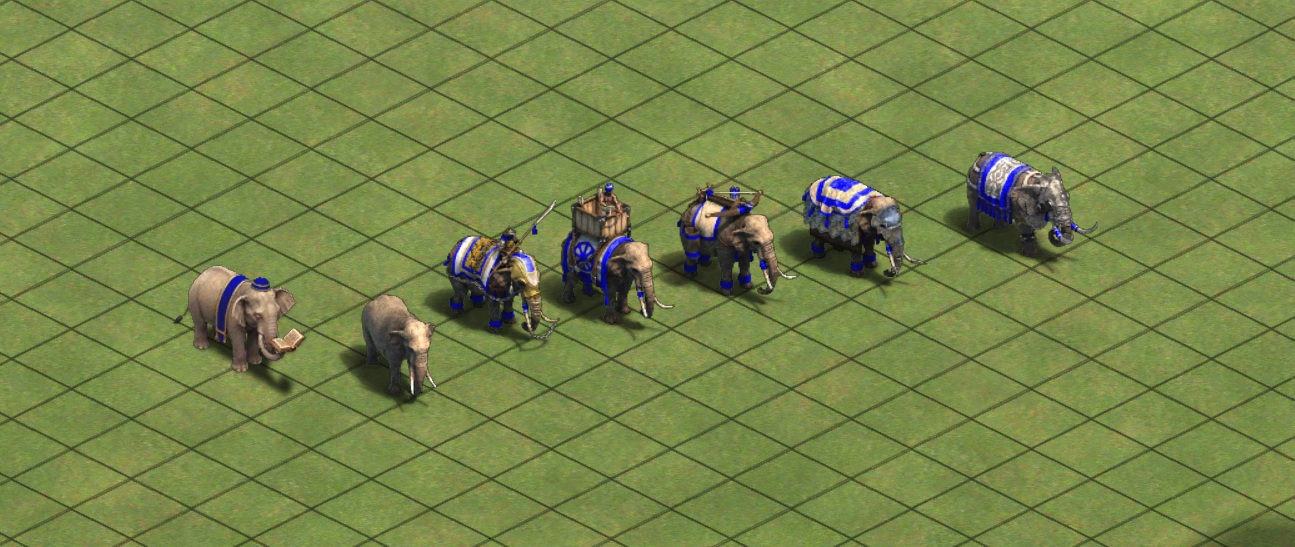
The starting design used existing Age of Empires artwork as a visual reference. GameLabs Studio could then establish the riderless elephant’s proportions, monk cap, blue-and-gold cloth, book, top-down camera, and rendering style.
Once a satisfactory base image existed, it became the reference for subsequent angles and animations. This was essential for keeping recognizable details consistent.
Multi-Angle Controls
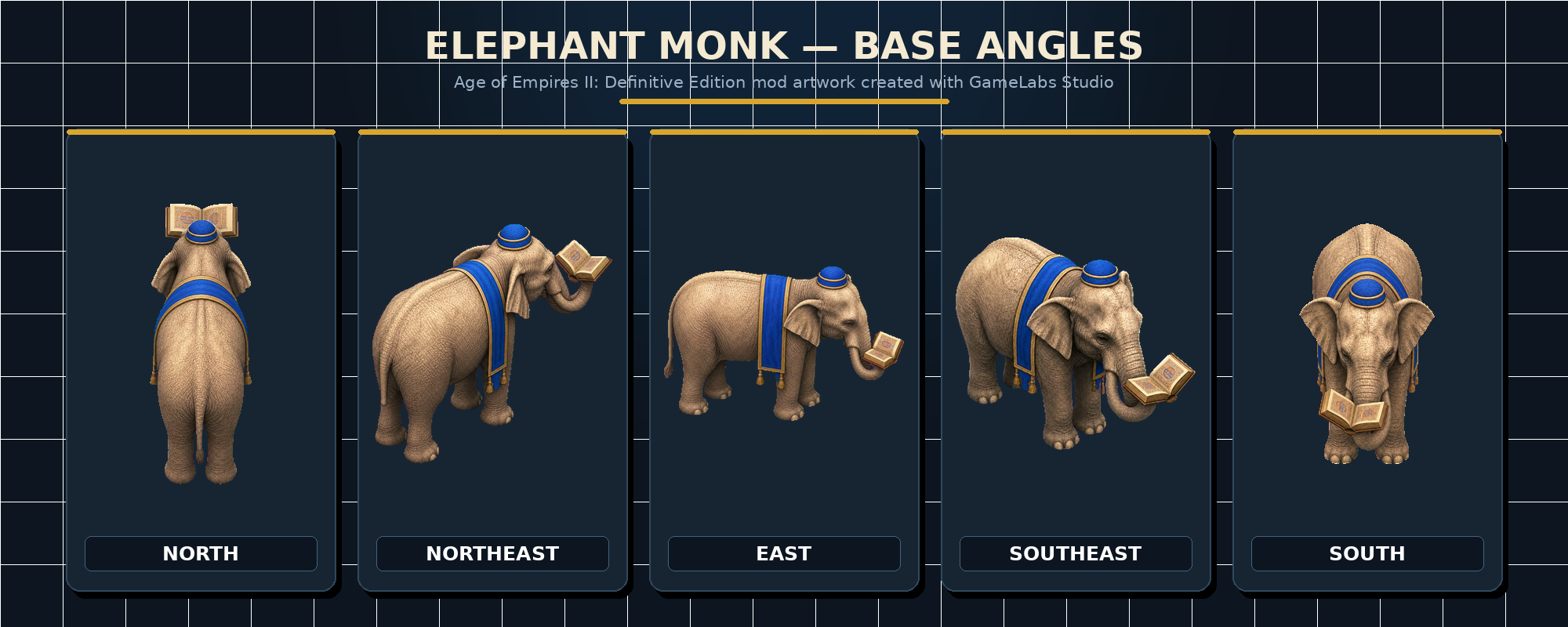
Age of Empires II uses directional unit graphics, so one attractive side view was not enough. GameLabs Studio provides separate camera and subject-orientation controls, allowing the workflow to request north, northeast, east, southeast, and south views while retaining the same underlying character design.
The opposite directions could then be produced by mirroring the appropriate source graphics during compilation. This reduced generation work while still supplying the directional facets expected by the game.
Custom, Reference-Consistent Animation
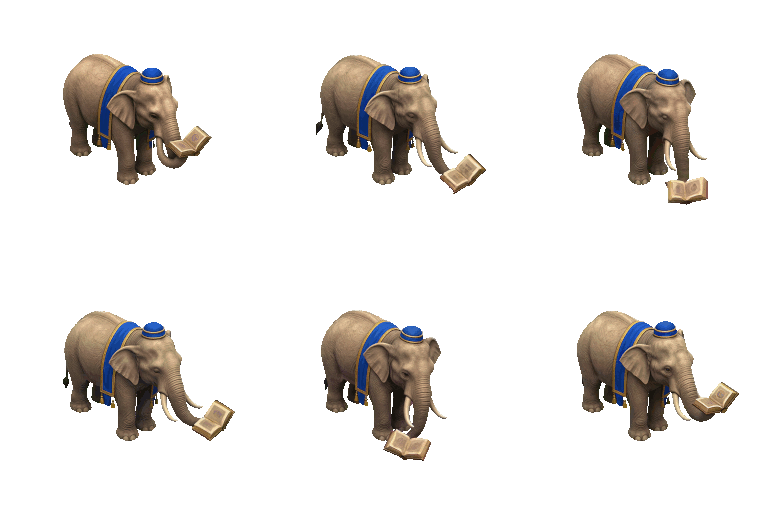
The mod required more than standard idle and walk cycles. Conversion and healing needed the elephant to wave the book with its trunk. The relic state needed a second set of idle and walking animations. Death had to transition naturally into decay rather than briefly returning to a living pose.
GameLabs Studio can animate an established source image using a custom motion description. Loopable movement could be requested for idle and walking, while conversion, healing, and death could use one-shot action prompts.
Because each animation began with the appropriate directional base image, the generated motion inherited the intended pose, equipment, camera, and silhouette.
End-to-End Transparency
Transparent edges are particularly important in an isometric strategy game. Any residual background becomes a visible box or halo around the moving unit.
GameLabs Studio carries a chroma-key background through image and video generation, then removes it during spritesheet export. Its transparency controls, chroma-key threshold, despill processing, and edge cleanup help preserve clean silhouettes and soft edge pixels.
This was especially valuable for the Elephant Monk’s trunk, book, ears, cloth tassels, legs, and relic: all areas where rough masking would be obvious in motion.
Configurable Spritesheet Export
Once an animation was approved, GameLabs Studio converted it into a spritesheet with control over frame rate, duration, rows, columns, padding, chroma-key removal, and edge processing.
For this project, the source animations were generally exported as four-by-four sheets containing 16 frames. Those frames could then be processed, aligned, scaled, mirrored, and compiled for Age of Empires II.
MCP Integration Inside the Development Environment
The GameLabs Studio MCP integration connected visual production directly to the coding workflow. An AI coding agent could create or reuse a project, generate images, request animations, monitor jobs, export spritesheets, download artifacts, and place them into the mod’s source directories.
This shortened the feedback loop considerably. The same agent coordinating asset generation could also inspect animation frames, build contact sheets, write conversion tools, compile graphics, validate frame counts, package the mod, and install it into the local Age of Empires II mod directory for testing.
How the Mod Was Built
1. Inspect the Original Game Assets
The first step was understanding the original Battle Elephant and regional Monk assets: their scale, animation timing, directional layout, file names, sound routing, and SLD frame structure.
This research also identified a way to implement the project as a graphics-and-sound replacement rather than a gameplay data mod. By replacing existing regional Monk resources without changing unit statistics or behavior, the mod remains compatible with ranked play under the game’s current mod rules.
2. Establish the Elephant Monk Design
A canonical Elephant Monk was generated with no rider, a small monk cap, narrow ceremonial cloth, and an open book held in its trunk. The body scale and perspective were calibrated against the native Battle Elephant.
3. Generate and Review Every Direction
Five core facings were generated and reviewed individually before animation. This review gate prevented an incorrect costume, prop, pose, or camera angle from being multiplied across an entire animation set.
4. Generate Each Animation State
Idle, walk, convert, heal, death, decay, relic idle, and relic walk animations were generated for every source direction. Loop boundaries were inspected so walking animations would contain one complete stride rather than multiple partial cycles.
Death endpoints were reused as references for decay sequences, ensuring that the corpse did not jump back into a living pose between animations.
5. Export and Process Transparent Frames
The animations were exported as transparent spritesheets and divided into individual frames. A custom Python pipeline produced mirrored directions, generated perspective-aware shadows, and assembled the directional frame order expected by Age of Empires II.
Special handling was added for death-shadow fading, decay transparency, stable click bounds, and animation timing.
6. Compile the AoE II Graphics
The processed frames were compiled into SLD files for the Asian, Indian, and Oriental regional Monk graphics. Frame maps were adjusted to match the timing and frame counts expected by each original animation entry.
7. Add Sound and Package the Mod
Battle Elephant selection and movement responses replaced the Monk’s normal voice lines. Conversion and healing retained their recognizable Monk audio, mixed with an elephant response and encoded into the Wwise-compatible format expected by the game.
Finally, the graphics, sounds, metadata, description, and thumbnail were validated and packaged into an upload-ready ZIP. The package contains no gameplay DAT file.
The Result: A Ranked-Compatible Pious Pachyderm
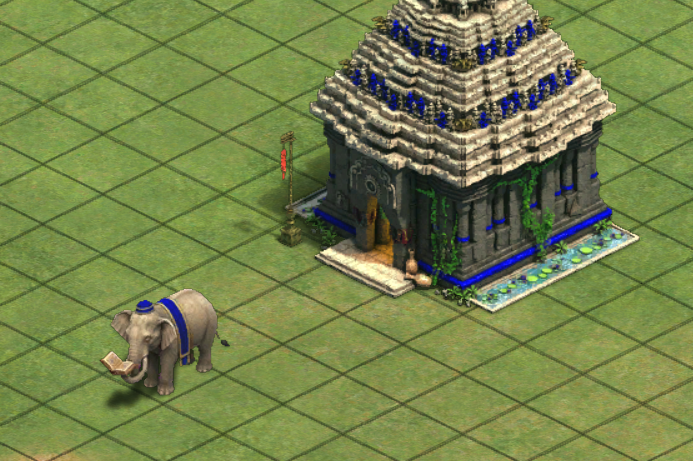
The finished Elephant Monk is deliberately whimsical, but it is also a complete production asset. It behaves like the original Monk, fits into Age of Empires II’s directional rendering system, carries relics, responds with elephant sounds, and includes the full set of animations needed by the game.
Most importantly, the project demonstrates how specialized visual generation and coding agents can complement one another. GameLabs Studio supplied the coherent artwork, directional variants, animation, transparency, and spritesheets. The development pipeline transformed those assets into a format that a legacy game could load and animate.
You can view the community discussion on the Age of Empires Forum or visit the Elephant Monk mod page.
Build Your Own Game-Ready Assets
Generate consistent viewing angles, custom animations, transparent frames, and configurable spritesheets through the Studio, API, or MCP workflow.
Create Your First Asset With GameLabs StudioAgent Instructions: Create an Age of Empires Mod With GameLabs Studio MCP
# Create an Age of Empires graphics mod with GameLabs Studio MCP

Use the GameLabs Studio MCP tools to create a complete, installable Age of Empires unit graphics mod.

## Requirements

1. Ask which Age of Empires title and edition the mod targets.
2. Ask which existing unit or regional graphics should be replaced.
3. Confirm whether the user wants:
   - A graphics-only mod
   - A graphics-and-sound mod
   - A data mod that changes gameplay
4. Prefer graphics or graphics-and-sound replacement files when gameplay changes are unnecessary.
5. Do not claim ranked compatibility until the current game rules and package contents have been verified.
6. Inspect the installed game's reference assets, animation names, frame counts, directions, scale, anchors, timing, shadows, audio format, and mod directory structure before generating artwork.

## GameLabs Studio project organization

- Search for an existing project before creating one.
- Create or reuse one dedicated project for the mod.
- Keep every viewing angle and animation for the unit under the same asset.
- Reuse the returned `project_id` and `asset_id` throughout the workflow.
- Generate and review the canonical base view before producing other angles.
- Wait for each required reference image to finish before using it to generate another view.

## Base image generation

Use `image_generate` with:

- A precise description of the unit's anatomy, clothing, equipment, pose, scale, and art style
- Reference images from the original game when legally available
- `transparent_bg: true`
- Appropriate `width` and `height`
- `centered: true`
- `three_quarter_top_down: true` when matching an AoE-style camera
- `camera_orientation` set to a supported value such as `top`
- `subject_orientation_in_frame` set to the required compass direction
- `edge_cleanup: true`

Do not mention transparency, alpha, chroma keying, or background removal in the text prompt. Use `transparent_bg` instead.

Create the minimum independent directions required by the game pipeline. For a symmetric AoE II unit, this may be north, northeast, east, southeast, and south, with the remaining directions mirrored during compilation.

Show every base direction to the user and obtain approval before animating it.

## Animation generation

For each approved direction, call `video_generate` with the completed `source_image_job_id`.

Keep the video associated with the same asset. When `source_image_job_id` is supplied, GameLabs Studio automatically associates the video with the source image's asset.

Generate every animation state required by the original unit, which may include:

- Idle
- Walk
- Attack
- Conversion or casting
- Healing
- Death
- Decay
- Relic or resource carry idle
- Relic or resource carry walk

Use:

- `loopable: true` for idle and movement cycles
- `loopable: false` for one-shot actions
- The correct duration and frame padding
- A motion prompt that keeps the camera fixed and preserves identity, equipment, scale, and foot position

For decay animations, use the final death pose as the source so the unit does not return to a living pose between states.

Poll queued jobs approximately every 60 seconds and processing jobs approximately every 30 seconds. A queued job is not stalled merely because its timestamp has not changed.

Review videos before creating spritesheets. Check character identity, costume, props, scale, camera, complete motion cycles, and transitions.

## Spritesheet generation

For each approved video, call `spritesheet_generate` with its `source_video_job_id`.

Specify:

- The required `fps`
- The portion of the source clip to include with `length_seconds`
- The required `cols` and `rows`
- `padding_px`
- The correct `chroma_key_hex`, or use automatic chroma-key selection
- Chroma threshold and despill settings
- Edge despill when needed

Keep the same asset association. Export PNG spritesheets with real alpha transparency.

Verify:

- Every frame has transparency
- The expected number of frames is present
- Frames are arranged in playback order
- One complete movement cycle is used
- The subject does not change scale or drift
- Feet and center anchors remain stable
- No background halo remains
- Props and clothing persist across every frame

## AoE conversion pipeline

After downloading the approved spritesheets:

1. Split each sheet into individual frames.
2. Normalize scale against the original game unit.
3. Preserve aspect ratio; do not resize frames independently.
4. Stabilize a consistent foot or center anchor.
5. Generate mirrored directions where appropriate.
6. Arrange frames in the directional order expected by the game.
7. Add game-appropriate shadows as a separate layer when required.
8. Match the original animation frame counts and timing.
9. Compile the frames into the format required by the target game, such as SLD for Age of Empires II: Definitive Edition.
10. Use the original regional graphic filenames when implementing a soft graphics replacement.
11. Keep gameplay DAT files out of the package unless functional changes are explicitly required.

## Sound and packaging

If sounds are included:

- Inspect the original sound routing and format.
- Use compatible Wwise WEM encoding where required.
- Preserve suitable action cues such as conversion and healing.
- Validate the generated audio in-game.

Create the target game's required mod structure and include:

- Graphics
- Optional sounds
- Metadata
- Description
- Thumbnail
- Installation or testing notes

Build an upload-ready ZIP with the mod files at the archive root expected by the official mod service.

## Validation

Before declaring the mod complete:

- Validate every compiled graphic header and frame count.
- Confirm all expected files exist and no unwanted data file is present.
- Install the mod into the local user mod directory.
- Test every direction and animation in-game.
- Check scale, timing, orientation, transparency, shadows, selection bounds, sounds, death-to-decay transitions, and carried-object states.
- Rebuild the ZIP after the final correction.
- Provide the archive path, validation results, and checksum to the user.