
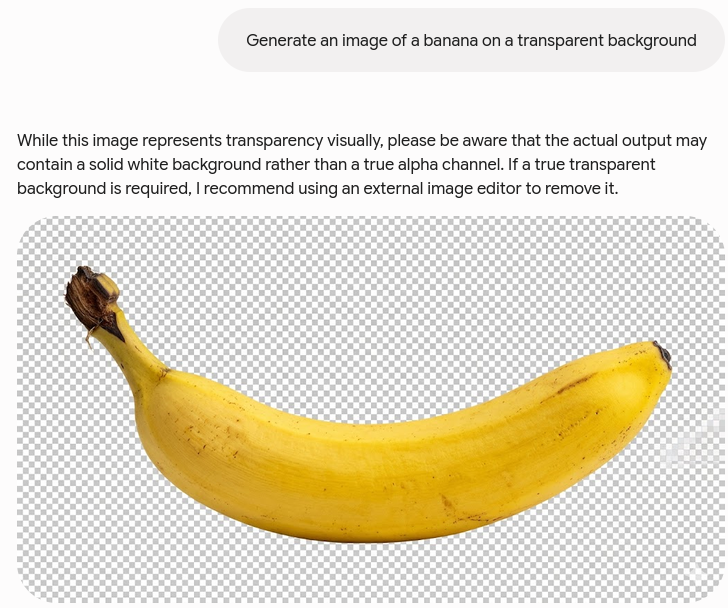
AI can write your movement controller, generate a beautiful character concept, and explain how to import a spritesheet into your engine. Then it leaves you with the hardest part: producing the consistent, transparent, game-ready animation frames that the spritesheet actually needs.
Tools such as ChatGPT, Google's Nano Banana, and Claude Code can accelerate parts of game development. But there is a major difference between generating an attractive image and building a production-ready game asset. A single impressive character portrait is not a walk cycle. A folder of loosely related images is not an animation. Code that slices a sprite atlas cannot fix frames in which the character's proportions, colors, equipment, and silhouette change every second.
This is the gap GameLabs Studio was built to solve.
AI Can Generate an Image. A Game Needs an Asset System.
Ask a general-purpose image model to create a fantasy warrior and it may return a striking result. That image can be useful for inspiration, concept art, or marketing. However, a playable 2D character requires much more:
- A consistent character design across every frame and viewing angle
- A stable silhouette, scale, and body position
- Matching colors, clothing, weapons, and accessories
- Clean animation timing and readable motion
- A consistent viewing angle and camera perspective
- Transparent backgrounds and clean edges
- Frames arranged into an engine-ready spritesheet
- Multiple actions such as idle, walk, run, attack, jump, and death
These are not minor finishing touches. They are the requirements that determine whether an image can function inside an actual game.
Why ChatGPT and Nano Banana Struggle With Spritesheets
General image generators typically treat each generation as a new composition. Even when you provide the same prompt or reference image, details can drift between outputs.
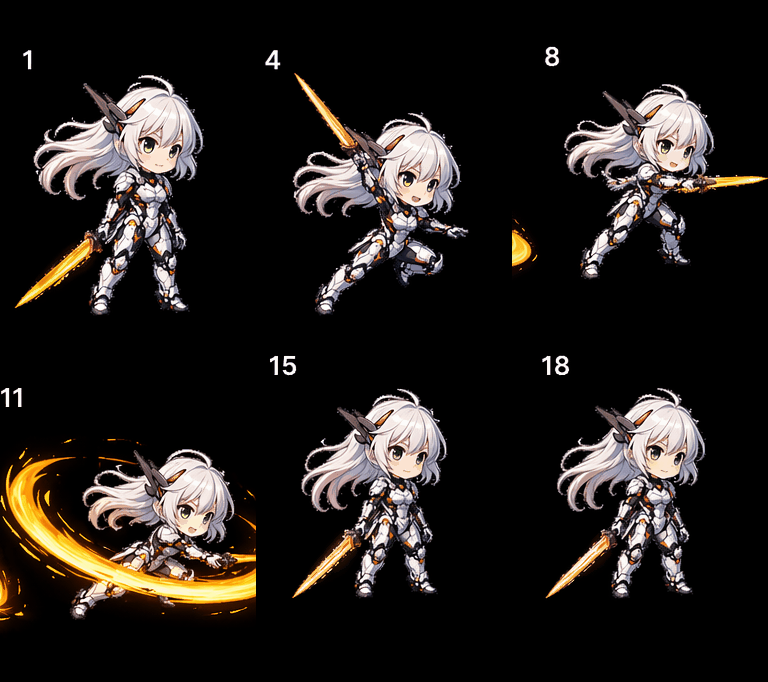
ChatGPT generated spritesheet example from this reddit thread
1. Character Identity Drifts Between Frames
Generate eight frames of a walk cycle independently and compare them. The character may become taller in one frame, wider in another, or gain different facial features halfway through the animation. A sword may change length. A shoulder pad may switch sides. Boots, gloves, hair, and clothing details can appear or disappear.
Each individual frame might look acceptable. Played together, the character flickers and morphs instead of walking.
2. The Palette and Rendering Style Change
Small color changes become obvious during animation. A dark red shirt in one frame may become bright orange in the next. Highlights can move unpredictably, outlines can change thickness, and the amount of detail can vary from frame to frame.
This creates visual noise that is especially noticeable in pixel art, where changing only a few pixels can alter the entire silhouette.
3. The Character Does Not Stay Anchored
Animation frames need a stable anchor point. The character's feet, center of mass, and position inside the frame must be controlled so the animation does not shake when played.
General image generators compose each result for visual appeal. They are not necessarily trying to preserve the same foot position, bounding box, scale, or center point across an animation sequence. The resulting cycle can jitter even when the character design remains recognizable.
4. Transparency Is Not a Complete Workflow
Some modern image tools can produce or approximate transparent backgrounds, but that does not automatically make their output game-ready. Transparency must remain clean and consistent across every frame. Background residue, halos, shadows, missing pixels, and inconsistent edge treatment can all create visible artifacts in the final game.
If the model outputs the character against a generated background, every frame may need manual masking or background removal. That turns a supposedly automated spritesheet into an image-editing project.
5. Good-Looking Frames Can Still Produce Bad Motion
An animation is not simply a collection of poses. The spacing, timing, anticipation, follow-through, and transition between poses determine whether an attack feels powerful or a walk feels natural.
When frames are generated as separate images, the motion often becomes jerky. Limbs jump between positions, the body changes shape, and important transition poses are missing. Fixing these problems requires manual redrawing, retiming, and cleanup.
Why Claude Code Cannot Solve the Asset Problem
Claude Code and similar coding agents can be extremely useful for game development. They can write gameplay systems, configure animation state machines, create import scripts, and connect assets to engines such as Unity, Godot, or Phaser.
But code cannot manufacture visual consistency that is missing from the source frames.
A coding agent can write a script that divides an image into a four-by-four grid. It cannot make a drifting character design consistent simply by slicing the image. It can remove a flat background color, but it cannot reliably reconstruct hair, clothing, or weapons that were accidentally removed with it. It can configure a walk animation, but it cannot turn broken poses into a convincing walk cycle.
The Viral Demo Trap
Social media is full of impressive AI image experiments. A recent example shared in the AI game development community showed how capable a new image model could be. You can view the discussion on Reddit.
Results like these are genuinely impressive, but they can create the wrong expectation. A polished sample proves that a model can generate a strong image. It does not prove that the model can produce dozens of consistent, transparent, aligned animation frames for the same character across multiple actions and viewing angles.
The real test is not whether one frame looks good. The real test is whether the character still looks like the same character when every frame is played at game speed.
GameLabs Studio Was Built for the Missing Middle
GameLabs Studio is designed around the complete journey from an idea to a usable game asset. Instead of treating every frame as an unrelated image, the workflow starts by establishing a baseline character and then uses that reference throughout the asset-production process.
The goal is not merely to generate art that looks like a game character. The goal is to create art that can actually be used as a game character.
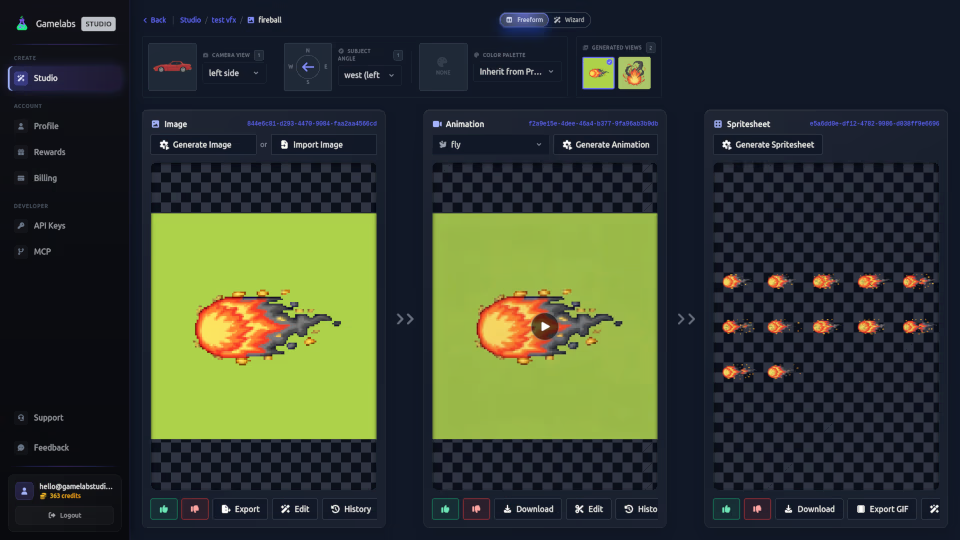
Step 1: Start With a Prompt, Concept, or Reference
Describe the character you want, upload an existing concept, or provide reference artwork. This gives you control over the visual direction without requiring a finished production asset.
Step 2: Generate the Baseline Sprite
Create the baseline sprite for the required viewing angle. This establishes the character's proportions, silhouette, clothing, palette, equipment, and overall style. The sprite is generated with transparency so it can be placed directly into a game scene.
Step 3: Create Reference-Consistent Animations
Use the baseline sprite as the visual reference for each action. Generate the animations your game needs, such as:
- Idle
- Walk
- Run
- Attack
- Jump
- Cast
- Take damage
- Death
- Custom
Because the process is organized around the established reference, the character remains much more consistent as it moves through different actions.
Step 4: Export a Transparent Spritesheet
Convert the animation into a spritesheet with transparency. The result is structured for use in a real game pipeline instead of being delivered as a decorative approximation of a sprite atlas.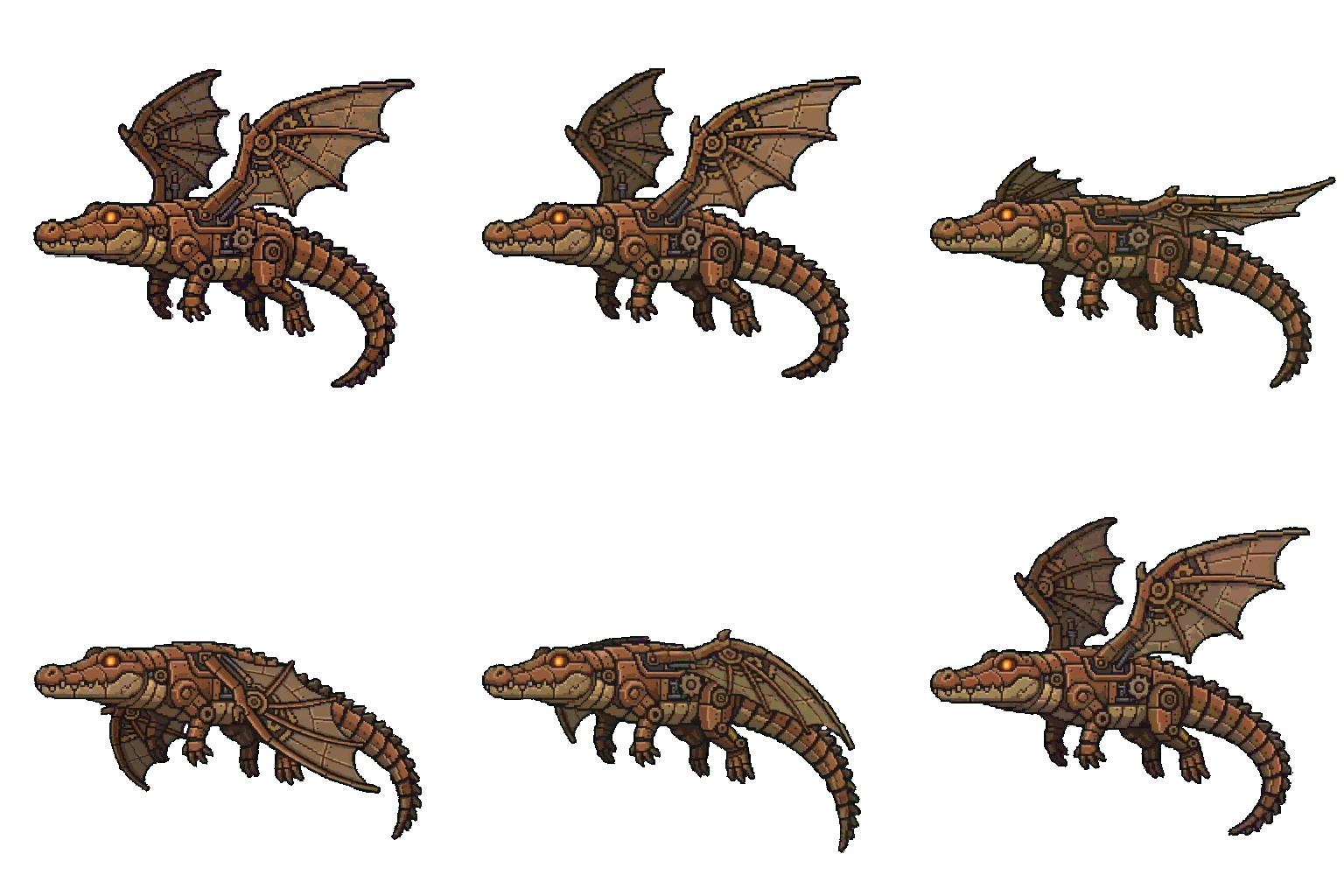
AI Should Reduce Manual Work, Not Create More of It
Without a dedicated workflow, developers can spend hours correcting AI-generated frames:
- Redrawing hands, faces, weapons, and clothing
- Matching colors across the animation
- Removing backgrounds one frame at a time
- Repositioning every frame to stop jitter
- Repairing broken silhouettes
- Adding missing transition poses
- Resizing, cropping, and arranging the final atlas
At that point, the developer is no longer directing an AI workflow. The developer is manually rescuing inconsistent output.
With GameLabs Studio, the human role is focused primarily on creative directnoreferrerion: deciding what the character looks like, choosing the angle, selecting the actions, and judging the results. The repetitive production work is handled through a workflow designed specifically for game assets.
Use Each AI Tool for What It Does Best
ChatGPT can help brainstorm characters, write dialogue, and design game systems. Nano Banana and other image models can help explore visual ideas. Claude Code can help implement gameplay, tools, and engine integrations.
These tools can all contribute to a game. The mistake is assuming that broad capability automatically equals a specialized, production-ready asset pipeline.
When your game needs consistent 2D characters, repeatable animations, transparent frames, and usable spritesheets, you need a workflow built around those exact requirements.
Stop Generating Pictures. Start Building Game Assets.
Turn a text prompt or character concept into consistent animations and transparent spritesheets with a workflow designed specifically for game development.
Create Your First Asset With GameLabs Studio