Welcome to Gamelabs Studio
A practical overview of projects, assets, generations, editors, maps, and exports.
What Gamelabs Studio does
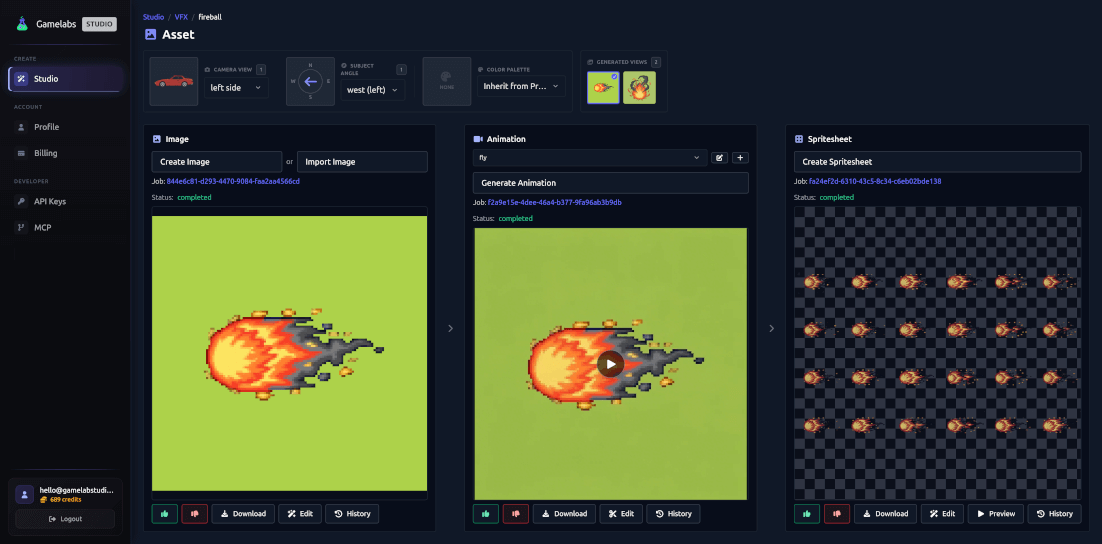
Gamelabs Studio is a workspace for creating game-ready images, animations, sprite sheets, tiles, props, backgrounds, and maps. You can begin with a text prompt, import your own image, reuse another generated view, or draw a rough sketch. The Studio keeps related outputs together so a character can have several angles and animations without becoming a pile of unrelated files.
The content hierarchy
- Projects organize content for a game, prototype, or asset pack.
- Folders organize assets inside a normal asset project.
- Assets represent a reusable subject such as a character, prop, effect, texture, or background.
- Generations are individual image, video, processing, or sprite-sheet jobs associated with an asset.
- Map projects contain maps plus terrain, linear, prop, tile, and background assets appropriate to one map type.
Two asset workflows
The Wizard guides you through an end product in a fixed sequence. Freeform exposes image, animation, and sprite-sheet stages at the same time and is better for iteration, multiple animations, histories, and advanced options. You can switch between them without losing completed work.
A reliable first workflow
- Create an Asset Project from Studio.
- Create an asset and name it after the subject, such as Forest Knight.
- Use Wizard if you want guidance or Freeform if you know the pipeline.
- Generate or import one clean base image.
- Create an animation only after the still image is correct.
- Generate a sprite sheet and inspect it in the Image Editor.
- Download the result and record frame size, layout, and FPS for your engine.